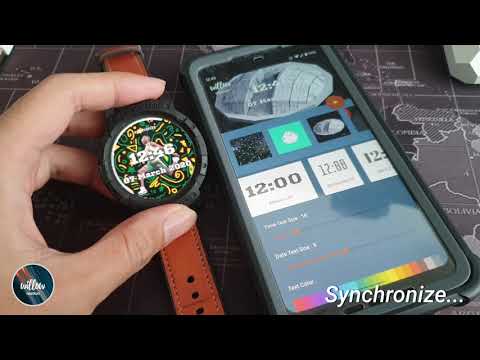

Willow Motion - GIF Watch Face
In-app purchases

star
757 reviews

PEGI 3
info
50K+
Downloads

PEGI 3
Learn more


About this app
Bring your Wear OS smartwatch to life with Willow Motion - the ultimate animated watch face creator.
Select any GIF from your gallery, or browse thousands of high-quality animations from Tenor's massive library. Whether it's a funny moment, a movie scene, or abstract art, make it your watch face.
SEAMLESS SYNC WITH WATCH PUSH API Experience fast and reliable transfers. Push your animated watch faces directly to your wrist using the Watch Push API, ensuring your design appears exactly as you created it.
ANIMATED WATCH FACES Transform your smartwatch with eye-catching animated GIFs that loop seamlessly. Stand out from static watch faces with dynamic, living designs.
DEEP CUSTOMIZATION • Adjustable time & date text sizes, colors, and positions • 8+ date format options • Custom fonts from our font gallery • Text shadow for better readability Willow Companion app on the phone.
SMART COMPLICATIONS Add up to 3 complications showing: • Battery, steps, heart rate • Weather, calendar, alarms • Activity rings and more Customize colors for each complication via Willow Companion app on the phone.
PRESET SYSTEM Save your favorite animated configurations as presets. Switch instantly or share with friends.
AUTO-CYCLING Set your watch face to automatically rotate through multiple GIFs at customizable intervals - from minutes to hours.
SUPPORTED DEVICES • smartwatch with Wear OS6 only
Make your watch face move with Willow Motion!
FAQ
https://ammarptn.gitbook.io/willow-watch-face/
any suggestion or bug, feel free to send it to
support@ammarptn.com
please include "Willow motion" in your email title
Select any GIF from your gallery, or browse thousands of high-quality animations from Tenor's massive library. Whether it's a funny moment, a movie scene, or abstract art, make it your watch face.
SEAMLESS SYNC WITH WATCH PUSH API Experience fast and reliable transfers. Push your animated watch faces directly to your wrist using the Watch Push API, ensuring your design appears exactly as you created it.
ANIMATED WATCH FACES Transform your smartwatch with eye-catching animated GIFs that loop seamlessly. Stand out from static watch faces with dynamic, living designs.
DEEP CUSTOMIZATION • Adjustable time & date text sizes, colors, and positions • 8+ date format options • Custom fonts from our font gallery • Text shadow for better readability Willow Companion app on the phone.
SMART COMPLICATIONS Add up to 3 complications showing: • Battery, steps, heart rate • Weather, calendar, alarms • Activity rings and more Customize colors for each complication via Willow Companion app on the phone.
PRESET SYSTEM Save your favorite animated configurations as presets. Switch instantly or share with friends.
AUTO-CYCLING Set your watch face to automatically rotate through multiple GIFs at customizable intervals - from minutes to hours.
SUPPORTED DEVICES • smartwatch with Wear OS6 only
Make your watch face move with Willow Motion!
FAQ
https://ammarptn.gitbook.io/willow-watch-face/
any suggestion or bug, feel free to send it to
support@ammarptn.com
please include "Willow motion" in your email title
Create personalized watch faces with GIFs & fonts. Endless possibilities!
Updated on
Safety starts with understanding how developers collect and share your data. Data privacy and security practices may vary based on your use, region and age. The developer provided this information and may update it over time.
- No data shared with third partiesLearn more about how developers declare sharing
- No data collectedLearn more about how developers declare collection
- Data is encrypted in transit
- You can request that data be deleted


Ratings and reviews
544 reviews

Andy Leather
- Flag inappropriate
5 July 2020
All this needs is a way to change the position of the time. I wanted a gif of Harley Quinn from the new animated series, it looks awesome on the watch. But the time was right over her face, whether centered or mot. I managed to sort of work around it accidentally, by getting the premium version and enabling complications, at first, that pushed the time completely off the screen with them enabled, but then centering the time just so happened to put it in exactly the right place at the top.
6 people found this review helpful

Vitaliano S
- Flag inappropriate
- Show review history
15 November 2021
My watch is the "Samsung Galaxy Watch 4." At first it was really difficult to set up the application. It took me 30 minutes of my time just to figure out how to use it. A quick summary of how to use it: Download onto phone > Download on watch from play store under "Apps on your phone" > Set as you watch face on the watch > Open app on phone to customize. Lastly if the watch face is not updating on your watch then turn off and on your watch.
7 people found this review helpful

Jordan Reid
- Flag inappropriate
- Show review history
29 January 2026
The updated "send to watch" button keeps getting in the way while trying to update my configurations. can't make 1 change without it popping up, this makes making changes a massive pain when changing colors of anything there's no way to copy/paste the chosen colors. so if you're trying to make cohesive themes most likely your colors for text/icons will always be different.
Ammarptn
2 February 2026
We’re very sorry for the frustration! We hear you—the 'Send to Watch' button shouldn't get in the way of your creativity. We’re also taking note of your feedback regarding color copy/pasting; we know how important it is to get those themes looking cohesive. We’re committed to improving the layout and features in our upcoming updates
PEGI 3
Learn moreApp support
About the developer
Ammar Lanui
support@ammarptn.com
18/6 Nawang Rd.
Jabangtikor, Muang Pattani
ปัตตานี 94000
Thailand


