
Automatic Scroll
Contains adsIn-app purchases

star
35.1K reviews

PEGI 3
info
50L+
Downloads


About this app
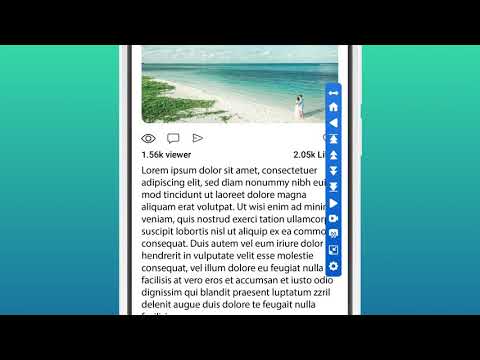
Auto Scroller: Auto Scrolling Text - Scrolling Automatically For Easy Viewing!
Do you get tired of swiping or scrolling through long pages while reading or browsing on your phone? With Auto Scroller: Auto Scrolling Text, you can finally relax and let the screen do the scrolling for you. This one-of-a-kind solution is intended to automate your scrolling experience all together and making viewing and reading seamless on Android devices.📄 Highlights of the Auto Scroller: Auto Scrolling Text: 📄
📜 Complete textual content shipment scrolling is Supported with custom controls;
📜 The modes of scrolling can be vertical or horizontal;
📜 Enables instant vertical and horizontal content scrolling to the bottom or top;
📜 Scrolling can automatically be set to start when a selected app is opened;
📜 Control scroll settings per app with options for speed, direction, and delay;
📜 Scrolling settings can be modified by the notifications panel;
📜 Scroll settings for reversal, direction, page size, timeout, and color;
Take Advantage of Auto Swipe: Automatic Scroll App For Android!
Auto Swipe: Automatic Scroll App For Android permits functioning without an attempt of physically interacting with the device for scrolling. While reading eBooks or observing real-time page updates, scrolling speed can be adjusted to the best fit with Auto Swipe: Automatic Scroll App For Android. Vertical and horizontal scrolling are Supported providing users better control over device interactions.Auto Swipe: Automatic Scroll App For Android automatically configures with personalized settings helping users to easily navigate through notes, articles, and other formats while offering enhanced viewing experiences.
Make Your Scrolling Experience Unique:📲
Autoscroll settings are very customizable, from scroll direction to page pause lengths. This enables you to preset how fast or slow the scrolling will be done, the area it will be done, whether it will be reversed, and even the colors. Moreover, each application can be set with different configurations, allowing endless personalization on how content is consumed in various apps.
Learning Made Easy:🤳
With a single click, any document or page can be automatically scrolled step by step while the phone executes all the required motions. Uncheck the options you wish to disable, and you can reliably depend on the autoscroller tool to take care of scrolling, so you can focus on tasks that truly matter.
Auto Scroller: Auto Scrolling Text 📝 📱👆
Enhancing the productivity and multitasking capabilities encourages efficient text processing and reduces strain on the hands and eyes. While reading or even browsing, the user is always in full control devoid of any physical actions. Designed for convenience and effortlessly eliminate the need for manual control, the autoscroller tool is ideal for convenience and accessibility enthusiasts.
Start Using Autoscroller Tool Today!
Experience the next level of effortless screen engagement with Auto Scroller: Auto Scrolling Text. Control, full customization, and smart features are a few clicks away without any hassle. If you have always wanted to scroll your way - automatically, effortlessly, and comfortably, then with Auto Swipe: Automatic Scroll App For Android and the Autoscroller tool, you can finally do so!Declaration :
Accessibility Service : We require Accessibility service permission to allow user to Scroll screen content Automatically as per selection of user. This application does not access or read any user data using accessibility.
Automatically Scroll the content on your phone screen without having to touch.
Updated on
Safety starts with understanding how developers collect and share your data. Data privacy and security practices may vary based on your use, region and age. The developer provided this information and may update it over time.
- This app may share these data types with third partiesDevice or other IDs
- No data collectedLearn more about how developers declare collection
- Data is encrypted in transit
- Data can’t be deleted


Ratings and reviews
34.2K reviews

Alexander
- Flag inappropriate
23 July 2026
It does what it's supposed to 👍🏻 l But it would be really great if the app didn't take so long to load when I open it. And no, it's not my Wi-Fi or my phone. I have a OnePlus 13, so a very fast phone, and all my other apps load faster. Also, could you please add the option to turn off the overlay directly? Right now, I have to go into the app and turn it off every time I want to. It's a bit annoying tbh. A "close" button directly in this menu would surely be feasible.
49 people found this review helpful
One Music Player
23 July 2026
Hello! We appreciate your suggestion very much and have shared it with our Developers so that they can have a look and proceed accordingly. We hope you keep enjoying the App for your purposes! For any questions or issues, please contact our support team by email so we can advise you accordingly.

Markus
- Flag inappropriate
29 March 2025
The lengths of ads and frequency is just too overwhelming and aggressive, I get it that you need/like ad revenue but to the point it becomes unusable and too annoying is not the way to do it. And rebranding it under another app name with different look to make more money is very lame (auto screen scroll app labeled as automatic scroll). reminds me on cloned website. Also difficult and unintuitive to get started despite some intro tutorial, and I'm a professional IT guy, 🤣
112 people found this review helpful

Lim Yu Jun Felixia
- Flag inappropriate
25 May 2022
One thing good is that it truly works. Purpose for downloading auto scroll app is so that we can free our hands and allow us to read the contents on our device and allow us to do other things at the same time. However, this app keeps jerking and doesn't allow me to read small letters(depicts the purpose). Maybe more suitable for people reading with bigger fonts with less details.
102 people found this review helpful
What's new
- General performance improvements for a smoother experience
- General maintenance and stability fixes
- Resolved several rare “App Not Responding” scenarios to keep the experience smooth
- General maintenance and stability fixes
- Resolved several rare “App Not Responding” scenarios to keep the experience smooth
App support
About the developer
DEEP SPARK LTD
support@onemusicplayer.com
16 Spinoza
TEL AVIV-JAFFA, 6438422
Israel
+1 701-620-4202


