
vFlat Scan - PDF Scanner, OCR
In-app purchases

star
1.78L reviews

PEGI 3
info
1Cr+
Downloads

PEGI 3
Learn more


About this app
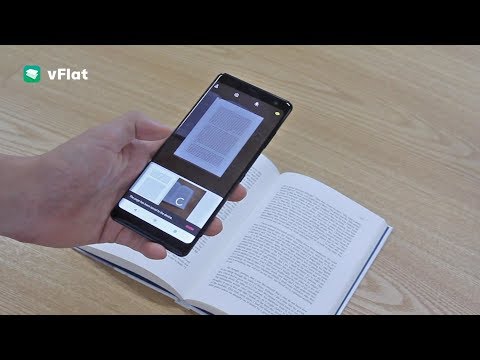
vFlat Scan is a powerful scanner app that automatically crops, flattens, and enhances images on your mobile device, allowing you to effortlessly scan, save, and share documents as digital files.
Convert images to text using vFlat Scan's text recognition (OCR) feature to copy, edit, and search for content in your documents.
Get unlimited scans without any annoying watermarks, ads, or sign-ins. Sounds too good to be true? Download vFlat Scan for free and start scanning right away!
NO ADS OR WATERMARKS
• Enjoy a complete ad-free UI with no sign-in required.
• vFlat Scan will not add watermarks to your scans.
CAPTURE DOCUMENTS
• Scan anything from receipts, books, forms, and notes without the need to manually crop them.
• Automatically detects document borders so you can get a clear-cut scan from any angle.
• Use Auto Scan to scan multiple pages in quick succession without needing to tap any buttons.
AUTO-FLATTEN & ENHANCE
• Documents are automatically flattened, even for curved book pages.
• Enable enhanced colors to boost color saturation and contrast for improved text visibility.
• Hide visible fingers in scans when holding books or documents.
SCAN TWO-PAGE BOOKS
• Capture two pages at once for better efficiency. Pages are automatically divided and saved.
• You can change the scan order to right-hand page first for right-to-left language books.
EXTRACT & USE TEXT
• Text recognition (OCR) allows you to extract text from any scanned image.
• Select, copy, and edit text directly in the app before sharing it as a Word or TXT file.
• Search for specific words or phrases across all your scans with extracted text.
TEXT TO SPEECH
• Text to speech (TTS) is also included. Play, pause, or skip to the next or previous sentence.
• Change the voice settings for faster or slower playback speed or different voice pitch.
ERASE HANDWRITTEN NOTES
• AI technology detects and removes all handwritten text or scribbles from books or other printed material so you can get a clean version of the document again.
SHARE FILES
• Scan, save, and share documents as PDF, JPG, Word, TXT, or ZIP files.
• Generate shareable URL links to view and download your scans via web browser.
vFlat does not collect your personal information or scans without your explicit consent.
Terms of Service - https://go.vflat.com/s/terms_en
Privacy Policy - https://go.vflat.com/s/privacy_en
Compatibility:
vFlat Scan is supported on devices running Android 8.0 or higher, with a minimum of 2 GB of RAM and OpenGL ES 3.1 or higher. Additionally, vFlat Scan is available for iPhone and iPad through the App Store.
If you enjoyed our app, please leave us a review.
We'd also love to hear your feedback. Please send us your comments and suggestions: support@vflat.com
Convert images to text using vFlat Scan's text recognition (OCR) feature to copy, edit, and search for content in your documents.
Get unlimited scans without any annoying watermarks, ads, or sign-ins. Sounds too good to be true? Download vFlat Scan for free and start scanning right away!
NO ADS OR WATERMARKS
• Enjoy a complete ad-free UI with no sign-in required.
• vFlat Scan will not add watermarks to your scans.
CAPTURE DOCUMENTS
• Scan anything from receipts, books, forms, and notes without the need to manually crop them.
• Automatically detects document borders so you can get a clear-cut scan from any angle.
• Use Auto Scan to scan multiple pages in quick succession without needing to tap any buttons.
AUTO-FLATTEN & ENHANCE
• Documents are automatically flattened, even for curved book pages.
• Enable enhanced colors to boost color saturation and contrast for improved text visibility.
• Hide visible fingers in scans when holding books or documents.
SCAN TWO-PAGE BOOKS
• Capture two pages at once for better efficiency. Pages are automatically divided and saved.
• You can change the scan order to right-hand page first for right-to-left language books.
EXTRACT & USE TEXT
• Text recognition (OCR) allows you to extract text from any scanned image.
• Select, copy, and edit text directly in the app before sharing it as a Word or TXT file.
• Search for specific words or phrases across all your scans with extracted text.
TEXT TO SPEECH
• Text to speech (TTS) is also included. Play, pause, or skip to the next or previous sentence.
• Change the voice settings for faster or slower playback speed or different voice pitch.
ERASE HANDWRITTEN NOTES
• AI technology detects and removes all handwritten text or scribbles from books or other printed material so you can get a clean version of the document again.
SHARE FILES
• Scan, save, and share documents as PDF, JPG, Word, TXT, or ZIP files.
• Generate shareable URL links to view and download your scans via web browser.
vFlat does not collect your personal information or scans without your explicit consent.
Terms of Service - https://go.vflat.com/s/terms_en
Privacy Policy - https://go.vflat.com/s/privacy_en
Compatibility:
vFlat Scan is supported on devices running Android 8.0 or higher, with a minimum of 2 GB of RAM and OpenGL ES 3.1 or higher. Additionally, vFlat Scan is available for iPhone and iPad through the App Store.
If you enjoyed our app, please leave us a review.
We'd also love to hear your feedback. Please send us your comments and suggestions: support@vflat.com
Fast, precise scanning with advanced AI. Strong privacy protection in a scan app
Updated on
Safety starts with understanding how developers collect and share your data. Data privacy and security practices may vary based on your use, region and age. The developer provided this information and may update it over time.


Ratings and reviews
1.74L reviews

Adwit Mukherji
- Flag inappropriate
28 April 2020
Best app for scanning pages using camera. This is almost as good as scanning it in a photocopier. Not only is it free but still completely add free but it has the best user interface the most versatile variety of functions I've seen such as exporting to PDF, quality control making ebooks and even sharing the files. It's got way better angle straightening, shadow removing, text enhancing and auto cropping of any other similar sized software. The finger removal is simply magic! LOVE this App!!!!
64 people found this review helpful

swaminathan subramanian
- Flag inappropriate
19 August 2026
I’ve used vFlat Scan for a long time and regularly updated it through Google Play. Suddenly, the app stopped working and asked me to update. But Play Store now says, “The app installed on your device didn't come from Google Play and won't get updates from Google Play.” This is extremely confusing and frustrating. Please investigate and provide a proper solution without requiring users to uninstall the app or risk losing their scans.
VoyagerX
20 August 2026
We apologize for the inconvenience. Please reach out to us via the 1:1 inquiry feature within the app, and we will be happy to assist you.
- vFlat Team

Matvei Vevitsis
- Flag inappropriate
- Show review history
9 August 2026
This app does one thing and it does it extremely well. If I had to nitpick I would like two improvements: 1. A manual toggle for color/black and white scanning (to help with yellowed pages); 2. The ability to sign up with an email address and credit card instead of going through Google
VoyagerX
10 August 2026
We appreciate your valuable feedback. We will discuss this internally.
- The vFlat Team
What's new
- Invite Friends (Earn Rewards)
Recommend vFlat to your friends and get more free allowance! Share your invite link or code to unlock extra rewards for both of you.
- Free Monthly Allowance
Easily track and manage your free monthly allowance and extra rewards earned from invites in one place.
- App stability improvements and bug fixes
Recommend vFlat to your friends and get more free allowance! Share your invite link or code to unlock extra rewards for both of you.
- Free Monthly Allowance
Easily track and manage your free monthly allowance and extra rewards earned from invites in one place.
- App stability improvements and bug fixes
PEGI 3
Learn moreApp support
About the developer
(주)보이저엑스
devadmin@voyagerx.com
서초구 서초대로38길 12,
10층(서초동, 마제스타시티 타워1)
서초구, 서울특별시 06655
South Korea
+82 10-3002-5189


