
ArtFlow: Paint Draw Sketchbook
Contains adsIn-app purchases

star
33.9K reviews

PEGI 3
info
5M+
Downloads
Editors' Choice
Enjoy this app, plus many more free of ads and in-app purchases, with a Google Play Pass subscription. Terms apply. Learn more


About this app
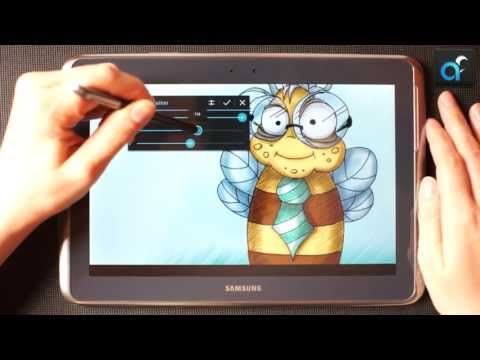
Convert your device into a digital sketchbook with more than 80 paint brushes, smudge, fill and an eraser tool. This fast and intuitive painting and drawing application will unlock the full power of your imagination. With support for pressure sensitive pens (like Samsung's S Pen) your device will be transformed into a real canvas.
Important: this is a free application with advanced features requiring a pro license in-app purchase. Single licence purchase will activate all devices associated with your Google account.
Features (some functions require pro license):
• High performance (GPU accelerated) paint engine
• Canvases up to 6144x6144 with 50 layers*
• Stylus pressure support
• Pressure simulation for touches†
• 100+ brushes and tools (including smudge tool and gradient fill)
• Create custom brushes from imported images
• Selection and selection masks
• Layer clipping mask
• 10 layer filters (HSV adjust, brightness & saturation, color curves and more)
• Material design inspired, fast, fluid, intuitive and accessible user interface
• Import and export supports PNG, JPG and PSD (Photoshop Document)
• NVIDIA DirectStylus support
• Palm rejection - no more accidental zooming and panning when drawing†
*) depending on device and available memory
†) some devices are incompatible with pressure simulation and palm rejection
You can paint, sketch and draw with ease thanks to fast and fluid brush engine. ArtFlow aims to replace your physical sketchpad and become universal art studio type application for Android™.
Artworks by:
Oleg Stepanko (https://instagram.com/rwidon)
Miguel Alvarado (https://www.instagram.com/3d.mike)
David Rivera (http://www.facebook.com/BlownHand)
Jon Mietling Portal Dragon (http://portaldragon.com)
Rob Pennycook
Marco Hurtado
Joel Ukeni (https://www.instagram.com/j.ukeni/)
Enrico Natoli
Andrew Easter
Andrei Lanuza (http://plus.google.com/+AndreiLanuza)
David Mingorance (http://davidmingorance.weebly.com)
EB Leung
Geremy Arene (http://www.youtube.com/geremy902)
ViBu (http://candynjuice.blogspot.com)
Oskar Stalberg
Unlicensed version limitation:
• 20 basic tools
• 3 layers
• Undo limited to 6 steps
• No PSD export
Important: this is a free application with advanced features requiring a pro license in-app purchase. Single licence purchase will activate all devices associated with your Google account.
Features (some functions require pro license):
• High performance (GPU accelerated) paint engine
• Canvases up to 6144x6144 with 50 layers*
• Stylus pressure support
• Pressure simulation for touches†
• 100+ brushes and tools (including smudge tool and gradient fill)
• Create custom brushes from imported images
• Selection and selection masks
• Layer clipping mask
• 10 layer filters (HSV adjust, brightness & saturation, color curves and more)
• Material design inspired, fast, fluid, intuitive and accessible user interface
• Import and export supports PNG, JPG and PSD (Photoshop Document)
• NVIDIA DirectStylus support
• Palm rejection - no more accidental zooming and panning when drawing†
*) depending on device and available memory
†) some devices are incompatible with pressure simulation and palm rejection
You can paint, sketch and draw with ease thanks to fast and fluid brush engine. ArtFlow aims to replace your physical sketchpad and become universal art studio type application for Android™.
Artworks by:
Oleg Stepanko (https://instagram.com/rwidon)
Miguel Alvarado (https://www.instagram.com/3d.mike)
David Rivera (http://www.facebook.com/BlownHand)
Jon Mietling Portal Dragon (http://portaldragon.com)
Rob Pennycook
Marco Hurtado
Joel Ukeni (https://www.instagram.com/j.ukeni/)
Enrico Natoli
Andrew Easter
Andrei Lanuza (http://plus.google.com/+AndreiLanuza)
David Mingorance (http://davidmingorance.weebly.com)
EB Leung
Geremy Arene (http://www.youtube.com/geremy902)
ViBu (http://candynjuice.blogspot.com)
Oskar Stalberg
Unlicensed version limitation:
• 20 basic tools
• 3 layers
• Undo limited to 6 steps
• No PSD export
Simple yet powerful sketch and paint application for artist of all ages
Updated on
Safety starts with understanding how developers collect and share your data. Data privacy and security practices may vary based on your use, region, and age. The developer provided this information and may update it over time.


Ratings and reviews
20.9K reviews

Sara Johnson
- Flag inappropriate
October 9, 2022
I used to love this app, but I've just spent the last 5 hours trying to draw my Christmas card image and had the app crash every time I tried to add a layer, select anything, merge layers, or just have the temerity to draw for a little too long. Having paid for the pro version, this is frankly annoying and I'm now debating if I can save it out to finish in another app or if I'll have to start again from scratch. Either way, Artflow has become completely unusable.
82 people found this review helpful

daniel f
- Flag inappropriate
May 30, 2020
Very good. I just paid for the full version. I had a problem with it sometimes not letting me paint, but turning off one of the settings (labelled "May not work") fixed it. So good. Lovely on the go. Great fit doodling, but also a fantastic set of really good brushes and tools for more advanced work.
18 people found this review helpful

Gaius Augustus
- Flag inappropriate
- Show review history
August 29, 2026
I've been using this app (paid version) for many years. I draw on my phone with my finger, and this app has provided me a way to make beautiful art without having to pull out my laptop. There are features I'd love to see added, like CMYK color selection & export (for printing) and a few more effects. But I've tried dozens of other apps on the Play store, and I always come back to this one.
5 people found this review helpful
What’s new
Play Billing library update to v8.0.0
Supported android version update (target SDK level update)
Supported android version update (target SDK level update)
App support
About the developer
BYTESTORM SOFTWARE BARTŁOMIEJ JANUSZ
bjanusz@artflowstudio.com
166a Ul. Wyzwolenia
41-710 Ruda Śląska
Poland
+48 605 788 781


