
DB: Departures Flip Watch Face


PEGI 3
info
0+
Downloads

PEGI 3
Learn more


About this app
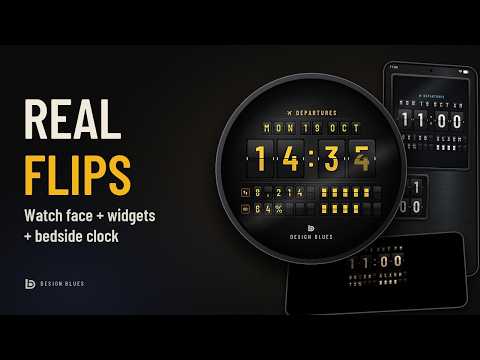
Departures turns your Wear OS watch into a split-flap departure board, the flip clock from old airports and train stations. Every minute a real flap falls and flips, not a fade. And it doesn't stop at your wrist: the same board comes with matching flip clock widgets for your phone's home screen, a bedside night clock while your phone charges, and wallpapers made from the widgets' own brushed metal. All in one download.
REAL FLIPS ON YOUR WRIST
Each digit is a rendered split flap. When the minute changes, the top flap falls, the new one swings down, overshoots and settles. Hours flip on the hour, in 12 h or 24 h. Raise your wrist and the date and both rows flutter through letters before they land, and every full hour the whole board refreshes, like a real departure board.
MATCHING HOME SCREEN WIDGETS
The companion phone app adds two flip clock widgets in a brushed-metal cabinet: a resizable board with the date and two rows, and a 2 × 2 clock. They use the same flaps as your watch face, flip on the minute, flutter on the hour and flutter when you tap them.
A BEDSIDE NIGHT CLOCK
Turn your phone on its side while it charges and the night board takes over as your screen saver: real flips, the hourly refresh and flaps lit by hidden lamps. Watch closely and you may catch a faulty lamp flickering.
WALLPAPERS THAT MATCH
Three wallpapers in the widgets' own brushed metal, set with one tap, plus a live wallpaper: its sheen moves as you tilt your phone, and the metal darkens for the night at 7 pm.
LIT AT NIGHT
From 7 pm to 6 am the room goes dark and a lamp hidden above every row lights the board: the top flaps catch the light, the lower flaps sit in shadow, and the characters glow through. Pick the light: warm, soft, cool, amber, ice or mint.
MAKE IT YOURS
• Three board styles: Classic graphite, Airport yellow and Ivory
• Five accent colours
• Two board rows for any complication: next event, steps, battery, weather, heart rate, world clock and more. Numbers flip digit by digit when they change, and anything with a goal becomes a gauge of flap blocks.
• 12 h or 24 h time: follow your watch, or choose one in the editor
• Day, date and month on flaps, with AM/PM in 12 h mode
• Tap the clock for alarms, tap the date for your calendar
• Turn wake flutter, hourly refresh and the leading zero on or off
ALWAYS-ON DISPLAY, KIND TO YOUR BATTERY
The always-on screen is a dark, still copy of the night board that lights only a few percent of the pixels.
COMPATIBILITY
Watch face: Wear OS 4 and newer (Watch Face Format), including Samsung Galaxy Watch and Google Pixel Watch. Not for Tizen watches.
Phone app (widgets, night clock and wallpapers): Android 8.0 and newer.
HOW TO INSTALL
1. Install Departures from Google Play on your phone, and choose your watch under "Install on more devices" (or install it from the Play Store on your watch).
2. Put it on your watch, either way: in the Departures phone app, tap "Open on watch" and set it on your watch; or long-press your current watch face, swipe to the end, tap Add and choose Departures.
3. To customise, long-press the watch face and tap Customise: board style, night light, accent colour and what each row shows.
4. On your phone, open the Departures app to add the widgets, set the night clock as your screen saver and pick a wallpaper.
PRIVACY
Departures collects no data. The watch face has no code of its own, and the phone app works entirely on your device.
Questions or ideas? Write to design6blues@gmail.com.
Designed by Design Blues.
REAL FLIPS ON YOUR WRIST
Each digit is a rendered split flap. When the minute changes, the top flap falls, the new one swings down, overshoots and settles. Hours flip on the hour, in 12 h or 24 h. Raise your wrist and the date and both rows flutter through letters before they land, and every full hour the whole board refreshes, like a real departure board.
MATCHING HOME SCREEN WIDGETS
The companion phone app adds two flip clock widgets in a brushed-metal cabinet: a resizable board with the date and two rows, and a 2 × 2 clock. They use the same flaps as your watch face, flip on the minute, flutter on the hour and flutter when you tap them.
A BEDSIDE NIGHT CLOCK
Turn your phone on its side while it charges and the night board takes over as your screen saver: real flips, the hourly refresh and flaps lit by hidden lamps. Watch closely and you may catch a faulty lamp flickering.
WALLPAPERS THAT MATCH
Three wallpapers in the widgets' own brushed metal, set with one tap, plus a live wallpaper: its sheen moves as you tilt your phone, and the metal darkens for the night at 7 pm.
LIT AT NIGHT
From 7 pm to 6 am the room goes dark and a lamp hidden above every row lights the board: the top flaps catch the light, the lower flaps sit in shadow, and the characters glow through. Pick the light: warm, soft, cool, amber, ice or mint.
MAKE IT YOURS
• Three board styles: Classic graphite, Airport yellow and Ivory
• Five accent colours
• Two board rows for any complication: next event, steps, battery, weather, heart rate, world clock and more. Numbers flip digit by digit when they change, and anything with a goal becomes a gauge of flap blocks.
• 12 h or 24 h time: follow your watch, or choose one in the editor
• Day, date and month on flaps, with AM/PM in 12 h mode
• Tap the clock for alarms, tap the date for your calendar
• Turn wake flutter, hourly refresh and the leading zero on or off
ALWAYS-ON DISPLAY, KIND TO YOUR BATTERY
The always-on screen is a dark, still copy of the night board that lights only a few percent of the pixels.
COMPATIBILITY
Watch face: Wear OS 4 and newer (Watch Face Format), including Samsung Galaxy Watch and Google Pixel Watch. Not for Tizen watches.
Phone app (widgets, night clock and wallpapers): Android 8.0 and newer.
HOW TO INSTALL
1. Install Departures from Google Play on your phone, and choose your watch under "Install on more devices" (or install it from the Play Store on your watch).
2. Put it on your watch, either way: in the Departures phone app, tap "Open on watch" and set it on your watch; or long-press your current watch face, swipe to the end, tap Add and choose Departures.
3. To customise, long-press the watch face and tap Customise: board style, night light, accent colour and what each row shows.
4. On your phone, open the Departures app to add the widgets, set the night clock as your screen saver and pick a wallpaper.
PRIVACY
Departures collects no data. The watch face has no code of its own, and the phone app works entirely on your device.
Questions or ideas? Write to design6blues@gmail.com.
Designed by Design Blues.
Flip clock watch face with real split-flap flips, matching widgets, night clock
Updated on
Safety starts with understanding how developers collect and share your data. Data privacy and security practices may vary based on your use, region, and age. The developer provided this information and may update it over time.
- No data shared with third partiesLearn more about how developers declare sharing
- No data collectedLearn more about how developers declare collection


What’s new
Open on watch now takes you to Play Store on your phone when no watch is connected.
New: Contact us, right in the app.
The status bar's clock is easier to read.
New: Contact us, right in the app.
The status bar's clock is easier to read.
PEGI 3
Learn moreApp support
About the developer
Mohamed Mufeeth Syed Ahamed
design6blues@gmail.com
12/1, Abubacker Street, Ayyampet-PO, Papanasam-TK
Tanjore, Tamil Nadu 614201
India


