
MetaTrader 4 Forex Trading

star
1.02M reviews

PEGI 3
info
10M+
Downloads

PEGI 3
Learn more


About this app
Trade Forex from your smartphone or tablet!
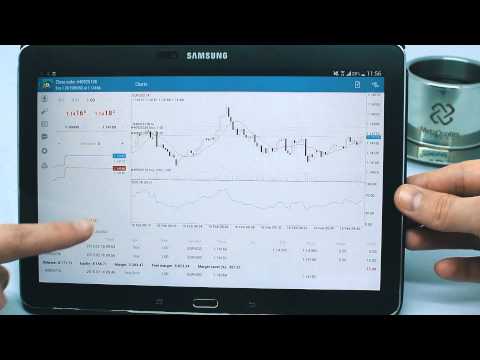
MetaTrader 4 (MT4) is the world's most popular Forex trading platform. Choose from hundreds of brokers and thousands of servers to trade using your MetaTrader (MT4) 4 Android app. Control your account, trade and analyze the Forex market using technical indicators and graphical objects.
Risk Warning: Our programs may involve real trading with a high risk of losing money rapidly. Most retail investor accounts lose money when trading financial products. You should consider whether you understand how various financial products work and whether you can afford to take the high risk of losing money.
TRADING
* Real-time quotes of Forex market
* Full set of trade orders, including pending orders
* All types of trade execution
* Detailed online trading history
ADVANCED TRADING
* Fast switching between financial instruments on charts
* Sound notifications assisting trading
* Customizable Forex chart color schemes
* Trade levels visualizing the prices of pending orders, as well as SL and TP values on the chart
* Free financial news — dozens of materials daily
* Chat with any registered MQL5.community trader
* Support of push notifications from the desktop MetaTrader 4 (MT4) platform and MQL5.community services
* Connection with hundreds of Forex Brokers
TECHNICAL ANALYSIS
* Interactive real-time Forex charts with zoom and scroll options
* 30 of the most popular technical indicators among traders
* 24 analytical objects: lines, channels, geometric shapes, as well as Gann, Fibonacci and Elliott tools
* 9 timeframes: M1, M5, M15, M30, H1, H4, D1, W1 and MN
* 3 types of charts: bars, Japanese candlesticks and broken line for efficient trading
Download MetaTrader 4 (MT4) for Android on your smartphone or tablet and trade Forex anytime and anywhere in the world!
To trade using real money, you need to open a real trading account by entering into a separate agreement with a financial company (broker), which has installed the server component of the MetaTrader 4 trading platform. MetaQuotes is a software company and does not provide financial services, nor it has access to MetaTrader 4 platform servers and databases managed by financial companies.
MetaTrader 4 (MT4) is the world's most popular Forex trading platform. Choose from hundreds of brokers and thousands of servers to trade using your MetaTrader (MT4) 4 Android app. Control your account, trade and analyze the Forex market using technical indicators and graphical objects.
Risk Warning: Our programs may involve real trading with a high risk of losing money rapidly. Most retail investor accounts lose money when trading financial products. You should consider whether you understand how various financial products work and whether you can afford to take the high risk of losing money.
TRADING
* Real-time quotes of Forex market
* Full set of trade orders, including pending orders
* All types of trade execution
* Detailed online trading history
ADVANCED TRADING
* Fast switching between financial instruments on charts
* Sound notifications assisting trading
* Customizable Forex chart color schemes
* Trade levels visualizing the prices of pending orders, as well as SL and TP values on the chart
* Free financial news — dozens of materials daily
* Chat with any registered MQL5.community trader
* Support of push notifications from the desktop MetaTrader 4 (MT4) platform and MQL5.community services
* Connection with hundreds of Forex Brokers
TECHNICAL ANALYSIS
* Interactive real-time Forex charts with zoom and scroll options
* 30 of the most popular technical indicators among traders
* 24 analytical objects: lines, channels, geometric shapes, as well as Gann, Fibonacci and Elliott tools
* 9 timeframes: M1, M5, M15, M30, H1, H4, D1, W1 and MN
* 3 types of charts: bars, Japanese candlesticks and broken line for efficient trading
Download MetaTrader 4 (MT4) for Android on your smartphone or tablet and trade Forex anytime and anywhere in the world!
To trade using real money, you need to open a real trading account by entering into a separate agreement with a financial company (broker), which has installed the server component of the MetaTrader 4 trading platform. MetaQuotes is a software company and does not provide financial services, nor it has access to MetaTrader 4 platform servers and databases managed by financial companies.
MetaTrader 4: Trade Forex at any time, at any place!
Updated on
Safety starts with understanding how developers collect and share your data. Data privacy and security practices may vary based on your use, region, and age. The developer provided this information and may update it over time.
- No data shared with third partiesLearn more about how developers declare sharing
- This app may collect these data typesPersonal info, Financial info and 4 others
- Data is encrypted in transit
- You can request that data be deleted


Ratings and reviews
987K reviews

Ibb Alam
- Flag inappropriate
July 19, 2023
Great for trading on the go, I can do most of my trading through the app, although it's much easier via a laptop screen, but that being said you can keep track of trades, open and close them fairly easily. Only wish they had the trailing stop feature built into the app, that would be super and I'd give a 5 star 🌟 only reason for not give a 5 star is for lacking some very useful risk management options.
62 people found this review helpful

A Google user
- Flag inappropriate
July 20, 2019
It has been around a long time and sometimes feels like it comes from the 90's compared to other modern platforms. However it is fast and the graphs are understood well. The reason it gets only the 3 stars an not 4 - developers never included reminders when price has reached a level. This facility, essential to trading, is not included neither in the Android version or the OS version.
55 people found this review helpful

Paint mad
- Flag inappropriate
April 2, 2021
This app is actually really good when you learn how to use it and what it has to offer. If anything that would make this app much better would be the drawings section. If you could just select the tools you mostly use and have them in your tools rather than every option like how you can actually do on the computer based platform. Another thing would be different time frames, although possibly given the most popular, its handy to be able to set different time frames to suit your days.
209 people found this review helpful
PEGI 3
Learn moreApp support
About the developer
MetaQuotes Software Corp.
stores@metaquotes.net
C/O The Private Trust Corporation Limited
Nassau
Bahamas
+357 25 030474


