
Sensu: One-Hand Controls
Achats via l'appli


PEGI 3
info
0+
Téléchargements


À propos de l'application
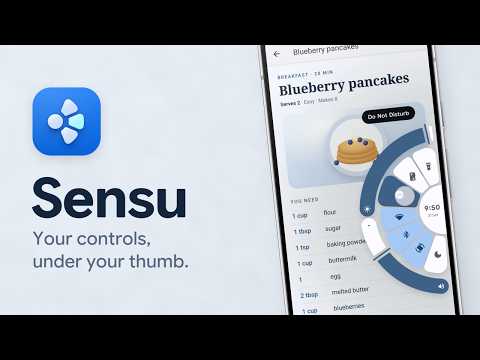
Sensu puts a pie menu at the edge of your screen, right under your thumb. Swipe in from a small handle, slide onto a slice and let go. Back, home, recent apps, your apps, quick toggles, brightness and volume, all with one hand and without stretching across a big phone.
WHAT'S IN THE PIE
• Over 70 actions: back, home, recent apps, notifications, quick settings, lock, screenshot, flashlight, auto-rotate, Do Not Disturb, media controls and more
• Your apps and their shortcuts
• Ready-made rings, plus one ring of your own
• Sliders that bend round the pie, up to three at once: brightness, media, ring and alarm volume, flashlight strength and song position
• Recent apps: the apps you used last, to switch back in a swipe
HANDLES WHERE YOUR THUMB IS
• On the left or right edge, with their size and position up to you
• Handles move up above the keyboard
• A tap or swipe on a handle that doesn't open the pie goes through to the app underneath
• Steps aside in games, full-screen video, landscape and on the lock screen
• Pause it from a Quick Settings tile
MAKE IT YOURS
• Color styles from soft tonal to AMOLED black, in your wallpaper's colors or a palette
• Set the pie's size and how fast it moves, all the way to instant
• Soft sounds, and haptics as strong as you like
SENSU PRO
One purchase, yours to keep:
• Now playing, Calendar and Current app in the pie: what's playing with a seek bar, what's left of your day, and Force stop or App info for the app you're in
• Hold a slice, group or ring for a second action
• As many rings of your own as you like, and rings inside rings
• Advanced actions through Shizuku or adb: Night Light, grayscale, animation speed, show taps and more
• Steps aside in the apps you pick
• Every sound set, all eight handle shapes and a custom color
• Backup and restore of your whole setup, by hand or on a schedule
THEMES
Expressive comes with Sensu. Glass, Retro, Monolith, Noir and Dot can be bought one at a time, all together, or with Pro as Everything.
PERMISSIONS
Sensu runs in Android's accessibility service. It uses it to draw the pie and its handles over other apps, to pass on taps that don't open the pie, and to carry out the slices you choose. It checks where the keyboard is so a handle can sit above it, and which app is open so it can step aside in games, video and the apps you pick. Apart from finding a list to scroll and the Force stop button in Settings when you ask for them, it does not read what is on your screen. Other access, like Modify system settings, notification access, your calendar or Shizuku, is asked for only when you use the slice that needs it.
WHAT'S IN THE PIE
• Over 70 actions: back, home, recent apps, notifications, quick settings, lock, screenshot, flashlight, auto-rotate, Do Not Disturb, media controls and more
• Your apps and their shortcuts
• Ready-made rings, plus one ring of your own
• Sliders that bend round the pie, up to three at once: brightness, media, ring and alarm volume, flashlight strength and song position
• Recent apps: the apps you used last, to switch back in a swipe
HANDLES WHERE YOUR THUMB IS
• On the left or right edge, with their size and position up to you
• Handles move up above the keyboard
• A tap or swipe on a handle that doesn't open the pie goes through to the app underneath
• Steps aside in games, full-screen video, landscape and on the lock screen
• Pause it from a Quick Settings tile
MAKE IT YOURS
• Color styles from soft tonal to AMOLED black, in your wallpaper's colors or a palette
• Set the pie's size and how fast it moves, all the way to instant
• Soft sounds, and haptics as strong as you like
SENSU PRO
One purchase, yours to keep:
• Now playing, Calendar and Current app in the pie: what's playing with a seek bar, what's left of your day, and Force stop or App info for the app you're in
• Hold a slice, group or ring for a second action
• As many rings of your own as you like, and rings inside rings
• Advanced actions through Shizuku or adb: Night Light, grayscale, animation speed, show taps and more
• Steps aside in the apps you pick
• Every sound set, all eight handle shapes and a custom color
• Backup and restore of your whole setup, by hand or on a schedule
THEMES
Expressive comes with Sensu. Glass, Retro, Monolith, Noir and Dot can be bought one at a time, all together, or with Pro as Everything.
PERMISSIONS
Sensu runs in Android's accessibility service. It uses it to draw the pie and its handles over other apps, to pass on taps that don't open the pie, and to carry out the slices you choose. It checks where the keyboard is so a handle can sit above it, and which app is open so it can step aside in games, video and the apps you pick. Apart from finding a list to scroll and the Force stop button in Settings when you ask for them, it does not read what is on your screen. Other access, like Modify system settings, notification access, your calendar or Shizuku, is asked for only when you use the slice that needs it.
A one-hand pie menu at your screen edge: apps, toggles, sliders and music.
Date de mise à jour
La sécurité, c'est d'abord comprendre comment les développeurs collectent et partagent vos données. Les pratiques concernant leur confidentialité et leur protection peuvent varier selon votre utilisation, votre région et votre âge. Le développeur a fourni ces informations et peut les modifier ultérieurement.
- Aucune donnée partagée avec des tiersEn savoir plus sur la manière dont les développeurs déclarent le partage
- Aucune donnée collectéeEn savoir plus sur la manière dont les développeurs déclarent la collecte


Nouveautés
The Split screen slice now works: on Android 15 and later through Shizuku, and on Android 11.
Setup and the tabs no longer stay blank when your phone's animations are turned off.
Trying a slider in Practice no longer changes your brightness or volume.
Sliders no longer make the vibration crackle when you slide fast.
Setup and the tabs no longer stay blank when your phone's animations are turned off.
Trying a slider in Practice no longer changes your brightness or volume.
Sliders no longer make the vibration crackle when you slide fast.
Assistance de l'appli
À propos du développeur
Piyush Ganesh Mamidwar
oto.music121@gmail.com
Aishwaryam Ventures H-803
Khandoba Chowk, Akurdi
Pune, Maharashtra 411035
India

